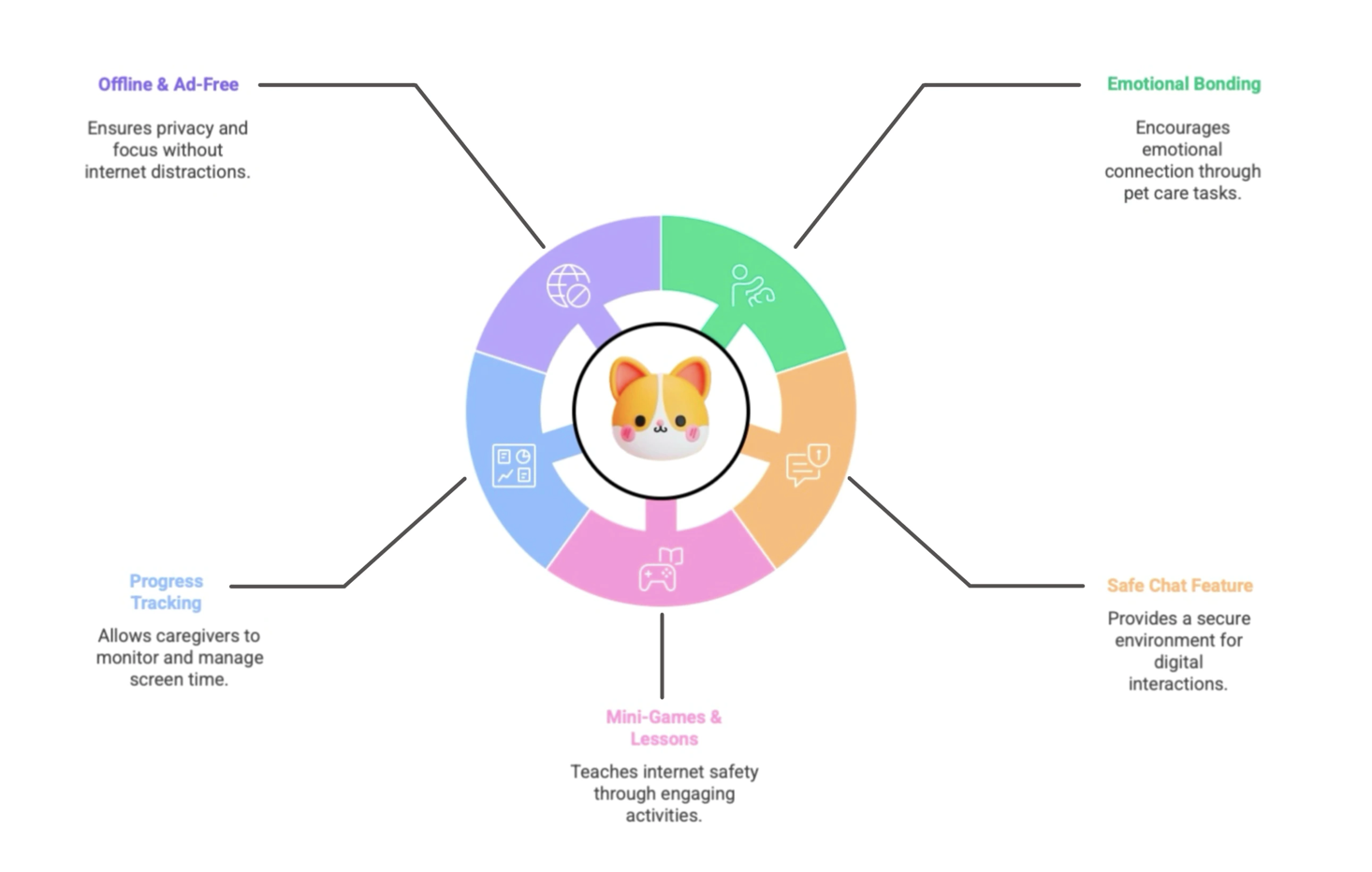
Since childproofing the internet isn't realistic, NetBuddy focuses on internet-proofing kids: playfully teaching them to navigate safely, spot scams and fake content, and understand the importance of being kind online. The app offers a safe space to learn, ask questions, and rely on a trusted digital companion for guidance.
Children and preteens increasingly access the internet at a young age, often without the tools to understand online risks. They are vulnerable to misinformation, inappropriate content, and potentially dangerous interactions. Existing media literacy tools often lack engagement and emotional support.
Target audience: Ages 4–7 (first device encounters), 7–10 (independent exploration), 11–14 (social media use), and caregivers needing visibility into their child's digital habits.
User research was conducted through interviews with parents and caregivers at a kindergarten in Munich. Inspiration was drawn from Duolingo's reward mechanics, Google's Internet Safety Program for Kids, and Cocomelon's use of colour, music, and repetition.
"We see children who can navigate YouTube but struggle with basic attention or social interaction."
Thomas, Kindergarten Worker"Media is often used as a distraction, not a learning tool, and that shows in how the kids behave."
Gabi, Pre-School Teacher"My mom always says I'm too addicted to my phone, but it's how I talk to friends."
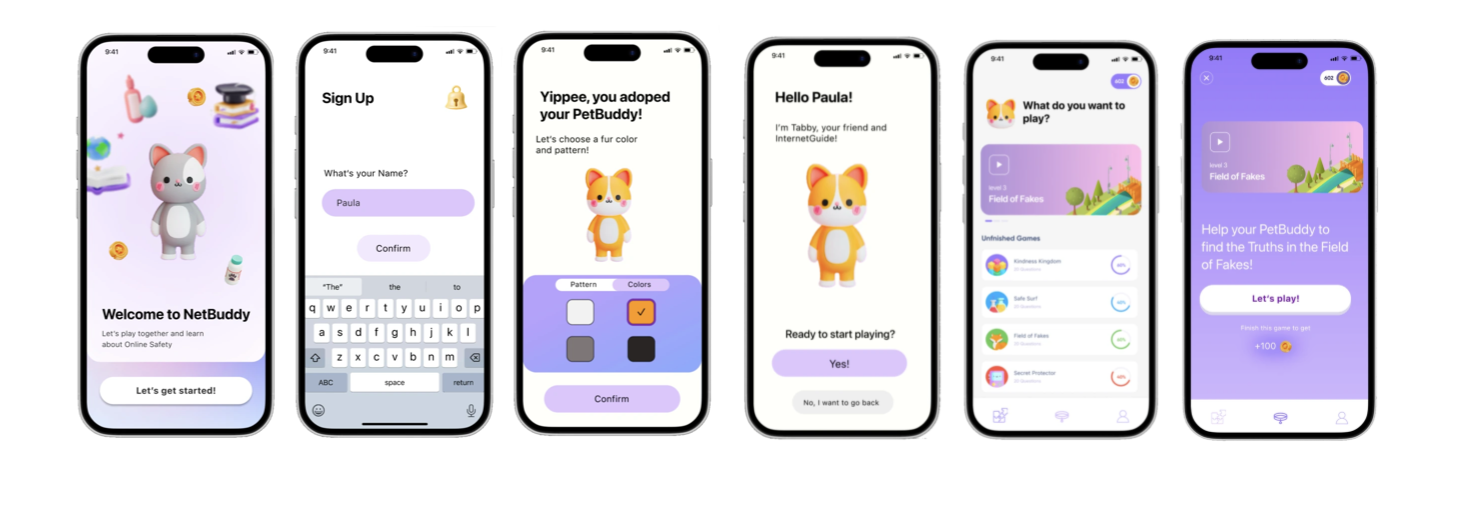
Vicky, 13NetBuddy is a gamified learning app that teaches media literacy and online safety through interactive lessons, story-based tasks, and a customisable pet companion. It blends emotional engagement with structured learning.
- High contrast, bright, saturated colours to retain children's attention
- Playful UI with rounded corners and animated transitions
- Simple, readable fonts and intuitive navigation
- Reward loops to reinforce positive behaviour
- Personalised pet-like character to build emotional connection and long-term engagement
Kids develop early habits of safe internet behaviour through emotional connection and interactive learning. The avatar and game-like environment make exploration feel natural. The PetBuddy becomes a trusted figure, reinforcing essential media skills while offering support for immediate questions.
Parents gain insight into their child's online behaviour and learning progress, with the comfort of knowing their child is discovering the digital world in a safe environment.
Around 22% of Germany's population, approximately 18.7 million people, are over 65. With society becoming increasingly digital, many elderly individuals struggle to keep up, as digital technology is no longer optional but essential.
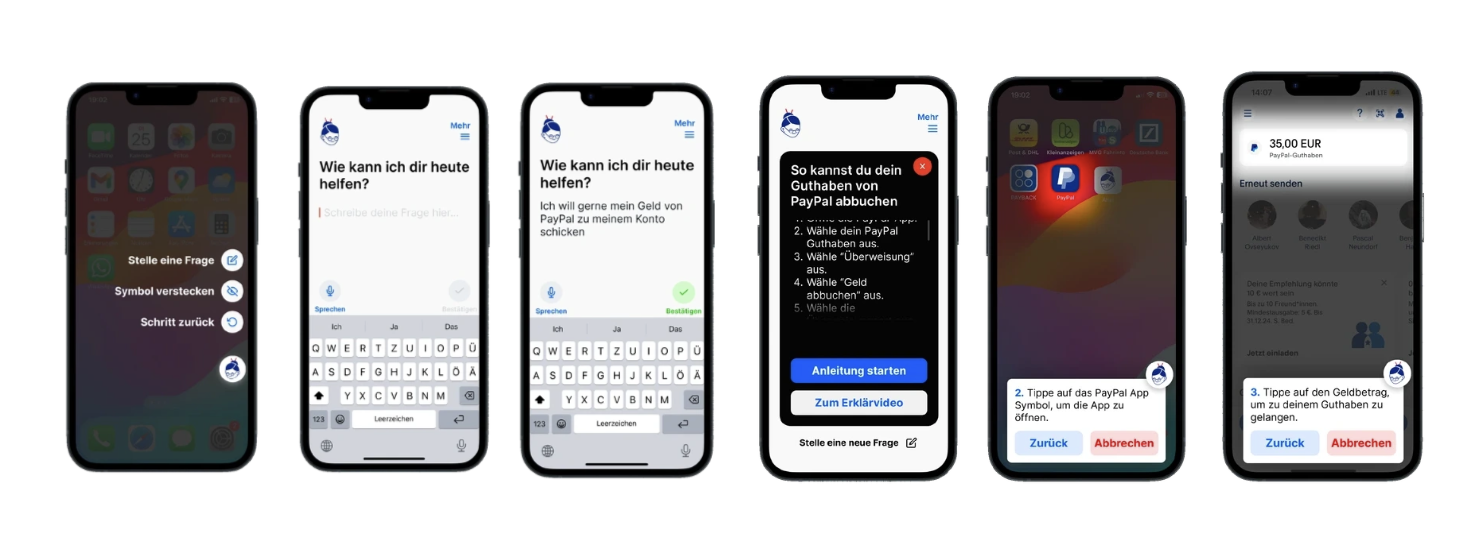
Many seniors struggle with unfamiliar interfaces, complex terminology, and the fear of making irreversible mistakes. Aha is a built-in digital assistant for iOS and Android that empowers older adults to navigate their phones independently, offering always-available guidance, subtle visual cues, and AI-driven eye-tracking, all while preserving privacy through on-device processing.
Research was conducted through field visits and observational studies at Pixel's DigitaleHilfe, a volunteer-driven support centre for older adults facing digital challenges. Semi-structured interviews with volunteers and end users uncovered pain points around terminology, iconography, and error anxiety. Early prototypes were tested with residents, with feedback focused on instruction clarity, interface readability, and perceived control.
"I'm scared of making mistakes with no way to undo them or not knowing how to go back."
"I often don't really know what some symbols stand for and what they do."
"When I click 'subscribe' I don't know what that entails and if it will cost money."
Three core problems emerged: fear of irreversible mistakes leading to reluctance to interact; inability to recognise icons or visual cues; and confusion around terminology requiring foundational digital knowledge to be built first.
- Build confidence and independence: guide each step while preserving agency, with simple undo and back options always available. Accomplishments foster self-confidence and competence.
- Alleviate anxiety and errors: eliminate fear of mistakes through clear, concise instructions and persistent recovery options. Less fear encourages exploration and greater digital participation.
- Persistent Button: A floating "Aha" assistant icon remains on every screen, ready to offer guidance or revisit previous instructions.
- Step-by-Step Guidance: Short, focused lessons introduce fundamental concepts (launching an app, adjusting volume) in simple language, prompting the user to act rather than passively observe.
- Eye-Tracking: When a user hesitates, the screen dims and spotlights the target area, guiding interaction without taking over. Users still tap and swipe themselves.
- Undo & Back: Every guided step includes an immediate way to reverse actions, reducing fear of errors.
- Simple Interface: High-contrast text, large fonts, and limited on-screen choices keep distractions to a minimum.
- Minimal Choices: Restrict on-screen options to reduce decision fatigue and cognitive overload.
- High Contrast & Large Text: Bold colour contrasts and bigger font sizes to accommodate visual impairments.
- Text-First Layout: Prioritise clear, written text instructions over abstract icons; reserve icons for universally recognised symbols only.
- Step-Back Button: A prominently placed "Zurück" control at every step reassures users they can easily reverse actions.
- Large Clickable Areas: Motor skills decline with age; interface targets are sized accordingly.
Integrated at the OS level (akin to AssistiveTouch), Aha processes all data locally. By avoiding cloud services and third-party dependencies, it addresses common privacy concerns among older adults and complies with stringent data-protection standards.
This was my first larger UX project, I learned a great deal, especially about conducting interviews and working closely with users.
- Building trust takes time: Elderly users are often sceptical; casual conversation before interviews would have led to richer insights.
- Interviews alone aren't enough: Informal, natural conversations yield more emotional depth than structured sessions.
- Explore physical solutions: Not every problem needs another app; tangible approaches could be more effective.
- Concept vs. reality: Eye-tracking and OS-level integration are exciting but currently unrealistic without manufacturer support and strong data protection frameworks.
- Design iteration shaped the concept: Going through multiple rounds of prototyping significantly influenced the final direction.